“Far Out in the uncharted backwaters of the unfashionable end of the Western Spiral arm of the galaxy lies a small unregarded yellow sun.”
– Douglas Adams, The Hitchhikers Guide to the Galaxy
A little solar system, far away, insignificant and quite an odd place to be. That’s how one of my favorite books describes where we all live. I think, despite the current rise in users, Mastodon and the Fediverse still look that way to many people.
My impression is that this is true for a significant part of my favorite community as well. Chris Wiegman wrote a powerful text on why WordPress should embrace the Fediverse, so that is covered. I want to focus more on how to migrate and not the “why”.
For everyone in the WordPress community who is just one last step away from leaving the commercialized and in many ways poisoned corporate social networks behind. Here is my guide to finding our little WordPress place on Mastodon in this huge collection of instances, blogs and applications we call the Fediverse.
Find an Instance
Mastodon is a decentralized network of instances (running the free Mastodon software) independently hosted, driven and funded by individuals with a wide range of intentions, goals and approaches. Sound familiar? Precisely! Working with WordPress or within the WordPress community, you should feel right at home. The WordPress blogging community and the Mastodon tooting community share much of the same foundation.
Take the same approach for finding an instance as for finding a blog you follow and ask yourself:
- What is the instance about?
- Who is running it?
- What are the moderation rules?
- Who else is here?
WordPress Mastodon Instances
If you want to consume a lot of WordPress content and/or intend to post some WordPress stuff yourself, a WordPress-related instance might be a good choice. The chances of finding a like-minded community and meaningful discourse are good. I host the WordPress instance wptoots.social; you’re welcome to join, but there are some other good choices:
- wpbuilds.social (currently 47 active users) – hosted by Nathan Wrigley (@nathan@wpbuilds.social) maker of the WP Builds Podcast
- dewp.space (currently 30 active users) – seems like a good choice if you feel at home in the German WordPress community
- wp-social.net (currently 33 active users) – hosted by a WordPress hosting service
- wptoots.social (currently 46 active users) – hosted by me
- fosstodon.org (currently 26k active users) – if your interests are more about free software in general and you want a bigger instance
- phpc.social (currently 2.1k active users) – if you see things more from the PHP side
To make your decision, I recommend starting by looking at the local timeline of an instance, if available without registration. That tells you what instance members have been up to. It also shows what you can expect regarding topics, posting frequency and tone of conversation. Take a look at the profile directory of each instance as well. And, of course, read the rules on the about page.
Many instances have more detailed community guides as well. These are interesting to learn more about how moderation works and what the instance’s members expect from you. For wptoots.social you can find our guide at community.wptoots.social.
Moving to another instance
A few words about moving to another instance. Perhaps you started on a more general instance and want to move to a WordPress-specific one. There is a documented process for moving, which works quite well. Moving works as follows:
- You keep your followers even on the new instance
- You can export a list of people you follow and re-follow all of them easily from the new instance
- Old posts stay on your old instance
- After you have moved, the old account from your previous instance (don’t delete it) will redirect to the new account
All in all, I think you can move without risks, especially if you don’t have a very large account.
Find people to follow
You’ve chosen your Fediverse home! Now you have to find people to follow and build a following. That can be tricky, because of the decentralized nature of Mastodon. The search function on your instance is limited to the content your instance “knows” about. That basically means what you can find in the federated timeline, which includes:
- Content and users on your instance
- Users followed by people on your instance, and their posts. These are the accounts they are are following
- Posts and users from relayed instances
So if you search for WordPress, be aware that the search doesn’t show every WordPress post from across the entire Fediverse.
The WordPress community on Mastodon
If you are looking for WordPress folks to follow, I’ve got just the right thing for you. I’m curating a list of WordPress community members on Mastodon. Everyone on the list has at least one community badge on profiles.wordpress.org.
I’m always looking for new list members. There is a description of how to get onto the list on the website. Sharing is appreciated.
Follow #Hashtags
Additionally, another good way of keeping track of specific topics is following hashtags. First search for a hashtag on your instance (e.g. #wordpress). Then, follow by clicking the small follow icon to the right, above the hashtag content.

Find posts from users on unconnected instances
Every now and then (actually more and more) someone shares a Mastodon post or user with me in a chat or something. The problem is that following that link directs me to the user’s instance (not my own). So boosting, following and liking don’t work directly, because I don’t have an account on that instance. However, clicking on the boost icon of a post shows the following dialog:
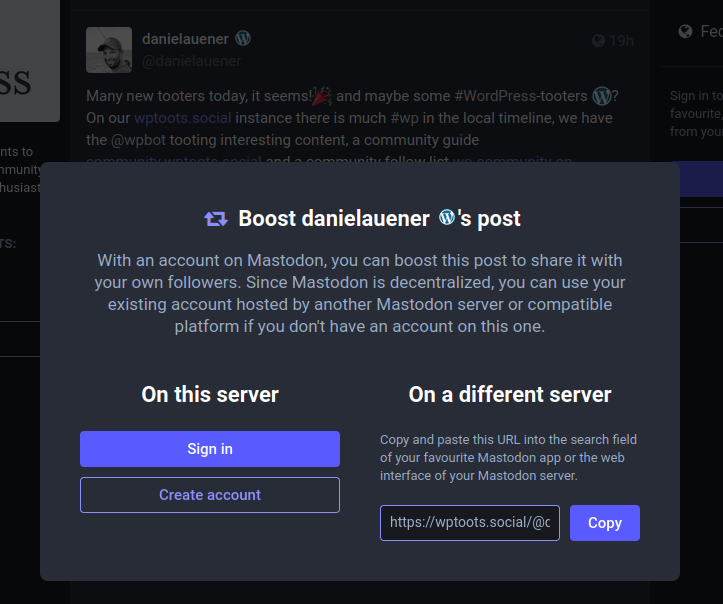
Now, you only have to copy the value in the “On a different server” input field and paste it to your instance’s (or app’s) search field. The same works for following a user. Now you will see the post or user via your instance and can follow, boost, like and answer.
Find bots to fill your timeline with interesting things
If you are like me and use your social timeline as a source of news, blog-posts etc, you might be interested in finding some bots that post relevant content. Bots can be a really great way to keep track of new content, but clearly they can be very annoying as well. On wptoots.social we run a WordPress bot, watching sources curated by the community on GitHub, which I think is a great addition to my timeline!
Engage with the community
Now, you know how to do things, you just have to start doing them! The first step should be to set up a nice profile. You know the drill from every other social platform. Try to make it unique and ensure it says something about you. Write a short, informative bio and use hashtags in it to show your topics.
A nice way to make a statement and catch the eye of potential followers is an emoji in your nickname (where the birdsite’s verification badge is). On WordPress-related servers you might have a WordPress icon available. Here is an example on my profile:
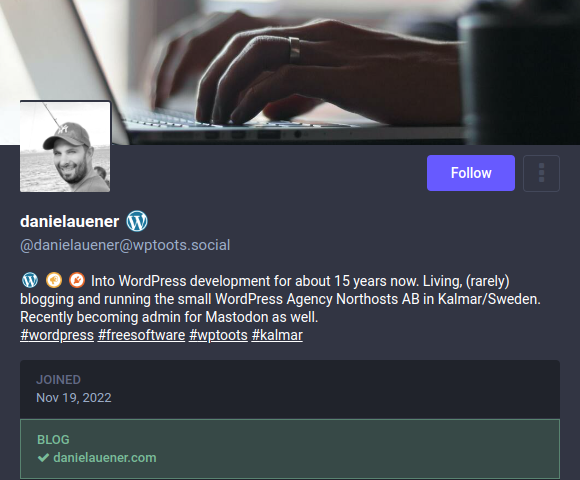
Above you see that you can even use emojis in your bio, where we have a really special treat on wptoots.social. For every existing badge on profiles.wordpress.org we have a corresponding emoji. So I can integrate the icons from my WordPress profile page (and only those) in my Mastodon bio and show everyone what I stand for:
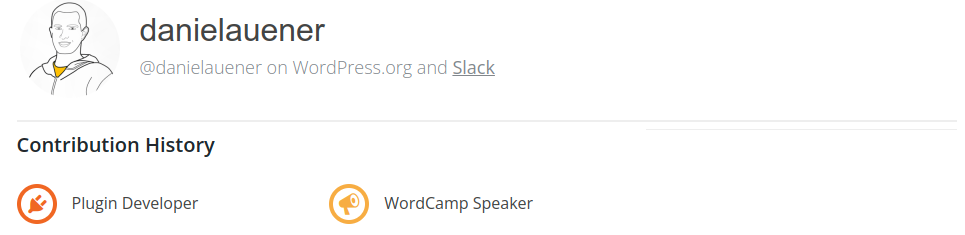
If you’re looking for real verification (not a blue verification icon everyone can use), you might want to verify your blog or website, as you can see in my Mastodon profile above. There are quite a few manuals for doing that, and some plugins as well.
Join the WordPress Community on Mastodon and the Fediverse
Finishing our small journey through the Fediverse for WordPress folks, I can only say: Please join us, it’s incredibly fun. In one Mastodon month I have connected and talked with more WordPress people than in several birdsite years. Concluding with Douglas Adams, of course:
The chances of finding out what’s really going on in the universe are so remote, the only thing to do is hang the sense of it and keep yourself occupied.
– The Hitchhikers Guide to the Galaxy